This guide is for founders and CEOs who built a business on Bubble and now need more control over the app. It focuses on the parts of a migration that affect time, cost, data, security, and the way Claude Code and Codex can help.
TLDR
A Bubble app with paying customers and live workflows usually takes 3 to 5 months to rebuild. The estimate is longer when the data isn’t clean or the app has many integrations.
Most full rebuilds need between $15k and $25k as investment. A DIY migration costs less cash but more time from your team.
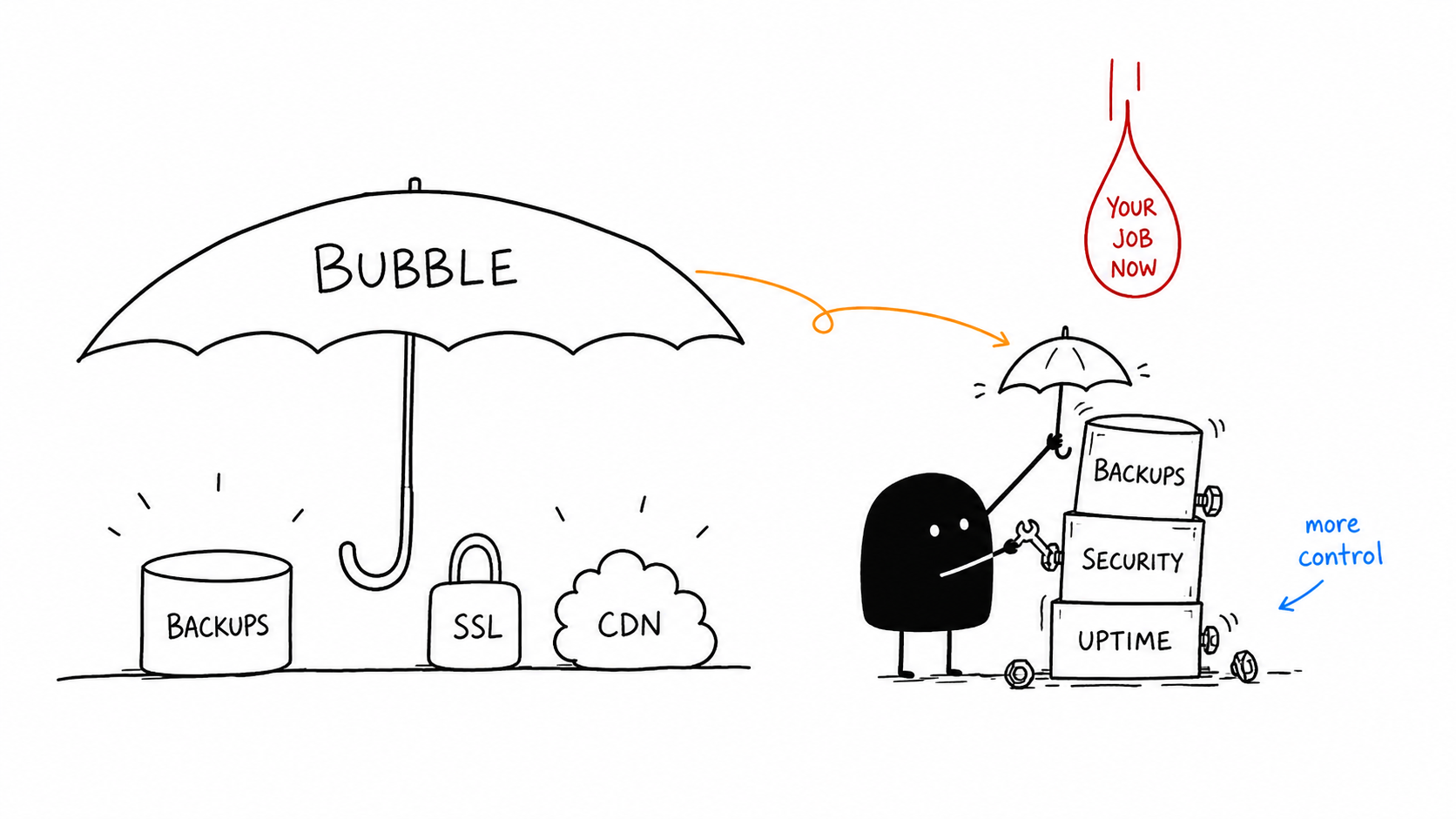
Code gives you ownership of the app and more control over performance, infrastructure, and integrations. It can also make the product easier to review when you raise funding or sell the business. In return, you now own the work Bubble handled for you, including security patches, backups, and uptime.
Claude Code and Codex let a smaller team do more of the rebuild. But they don’t remove the need for someone who can check the data, security rules, and business logic.
When to move a Bubble app to code
Bubble is good at getting an idea in front of paying users without a full development team. You may have reached its limits when:
App performance drops as users grow.
A small change breaks a part of the app you didn’t touch.
You need a feature Bubble can’t support, such as heavy background processing.
Your team spends a third to half of its time fixing bugs instead of improving the product.
Workload Unit costs rise as usage grows.
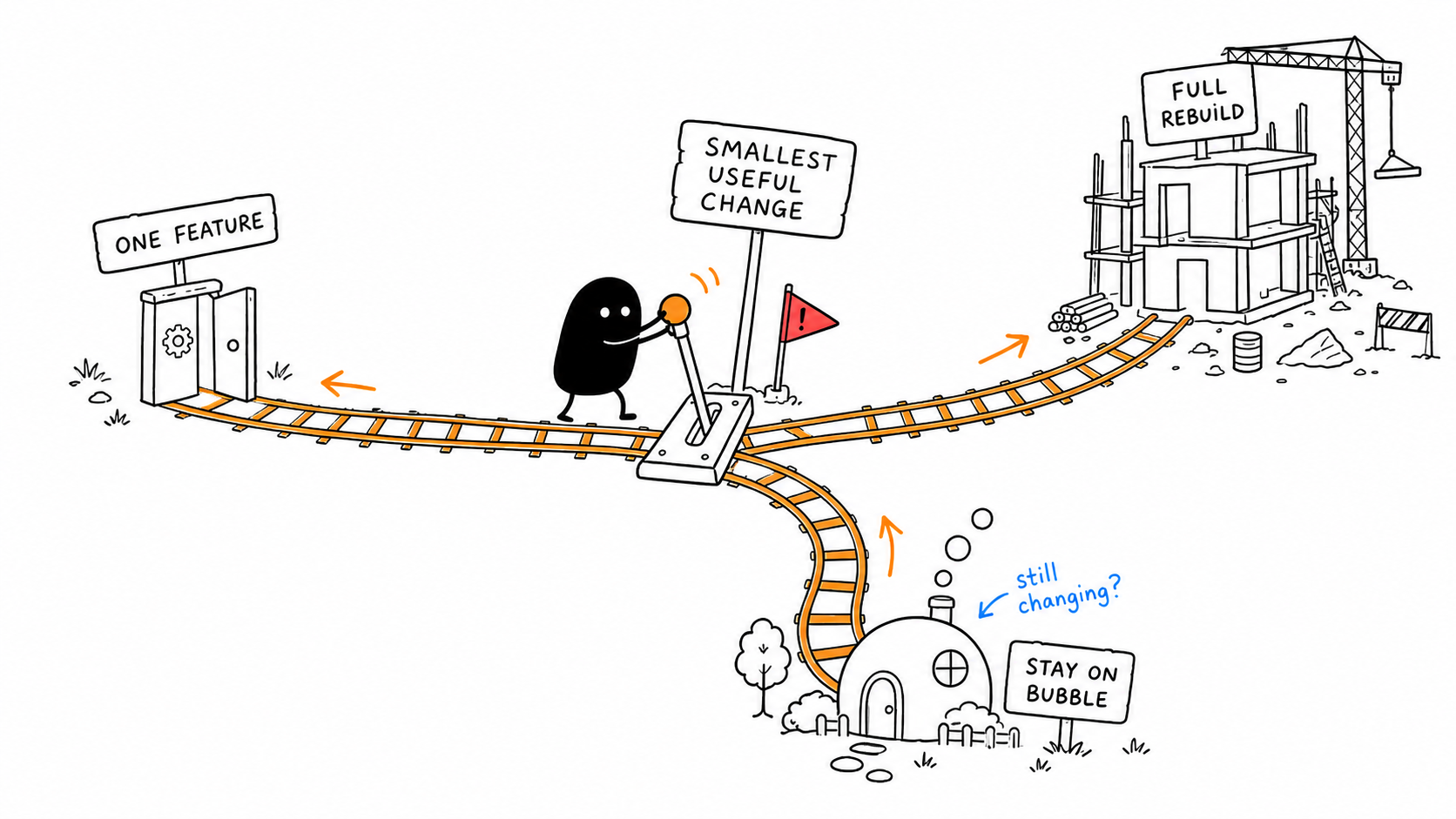
Don’t treat migration as all or nothing. Rebuild the part that is causing the problem and leave the rest on Bubble when that is enough.
Before estimating the work, decide whether to move one feature or the whole app. If you are deciding whether an agent fits your process, start with what an AI agent is.
If one feature is the only problem, build that feature in code and keep Bubble for the rest.
If performance and cost are getting worse but the app still works, plan a full rebuild in phases.
If you have reached the ceiling across the app, need to raise funding, or want to own the source code, plan a full migration.
If you are still finding product-market fit and the app changes every week, stay on Bubble. Moving now will make each change slower.
One thing Bubble can't do, everything else is fine
→
Build that one piece in code, keep the rest on Bubble
Performance and cost hurt, but the app works
→
Plan a full rebuild, done in phases
You've hit the ceiling everywhere (funding, ownership)
→
Plan a full migration
Still finding product-market fit, app changes weekly
→
Stay on Bubble. Migrating now is premature
Custom code removes specific Bubble limits
The value of the move depends on the problem you are trying to solve. Custom code gives you options that are difficult or unavailable in Bubble.
Real-time features use WebSockets
WebSockets can power live dashboards, collaborative editing, and instant notifications. Users see updates without refreshing the page.
AI and ML models connect directly
You can call AI models from your own backend instead of relying on third-party plugins. You control the model, request flow, limits, and cost.
Native mobile apps use device features
You can build iOS and Android apps with native performance and device integrations instead of wrapping a web app.
Background jobs run outside the request
Long-running and compute-heavy jobs can run in the background without Bubble usage quotas limiting the design.
Performance work reaches the database
You can tune database queries, caching, and the app structure instead of working around a platform limit.
Infrastructure matches the product
You choose the cloud provider, deployment method, and scaling approach. That gives you more control over security, compliance, and cost.
Costs are based on infrastructure
There is no per-action price. You pay for the database, hosting, storage, and other services you use.
Bubble concepts map to code
The product still does the same work after migration. The difference is who sets up each part and where you maintain it.
Adding tables and fields
Bubble: Create a data type in the Data tab and add fields.
Code: Define a database schema, and an AI agent generates the migration.
Searching or querying data
Bubble: Use “Do a search for” with constraints.
Code: Write a query using SQL or an ORM, with the AI agent generating most of the implementation.
Business rules and workflows
Bubble: Build workflows by dragging actions onto the workflow canvas.
Code: Define functions that run in response to events, with the AI agent implementing the logic.
Conditional logic
Bubble: Add “Only when” conditions to actions.
Code: Use standard if statements and other programming constructs.
User authentication
Bubble: Authentication is built in and works out of the box.
Code: Choose an authentication provider and integrate it into your application.
File uploads
Bubble: Files are uploaded and stored automatically.
Code: Configure object storage and implement the upload flow yourself.
Third-party API integration
Bubble: Connect APIs using the API Connector without writing code.
Code: Make direct API calls, giving you control over requests, authentication, and error handling.
Email sending
Bubble: Use a built-in action or a plugin.
Code: Integrate an email service and configure deliverability settings such as SPF and DKIM.
Scheduled jobs
Bubble: Use “Schedule API Workflow.”
Code: Run scheduled tasks with cron jobs or background workers.
Access control
Bubble: Configure Privacy Rules.
Code: Implement row-level security and server-side authorisation.
Deploying changes
Bubble: Click Preview or Deploy.
Code: Commit changes to Git, let CI run tests, and deploy through a release pipeline.
Debugging
Bubble: Step through workflows using the debugger.
Code: Inspect logs, run automated tests, and reproduce issues locally.
Version control
Bubble: Rely on Bubble’s save points and version history.
Code: Use Git for complete version history, branching, code reviews, and reliable rollbacks.
Where Bubble migrations go wrong
The expensive mistakes come from assuming that the code version works like the Bubble version. It doesn’t.
Visual workflows become code
In Bubble, you drag workflow steps onto a canvas. In code, logic lives in functions that run after a user click, an API call, or a timer.
The logic may be the same. The place where you inspect and change it is different, so document each workflow before rebuilding it.
Bubble data becomes a strict database
Bubble data types become tables and fields become columns. In Postgres, a number field rejects text. That strictness protects the new system, but it also exposes old data that Bubble allowed.
Privacy Rules become application code
Bubble Privacy Rules decide who can see each record. In custom code, you must write that protection. A new app is open until you add server-side checks, database rules, and tests.
Rebuild every Bubble rule. If you skip one, the new app may expose data that was private before.
Frontend and backend become separate services
Bubble puts the frontend, backend, database, and hosting in one editor. Custom code separates them. There is more to configure, but clear boundaries also let two AI agents work on different parts without editing the same files.
Plugins become packages and APIs
A Bubble plugin becomes a library or an API call. You get more control, but you also need to set up authentication, error handling, updates, and tests.
Prepare the Bubble app before writing code
Bubble has no one-click migration to code. You can’t export the HTML or workflows. You can export data, but the export needs careful handling.
The Data tab lets you download each data type as a CSV. Editor access bypasses Privacy Rules, so this export includes everything the editor can see.
The Data API returns 100 records per request. Use cursor-based pagination to fetch a full table.
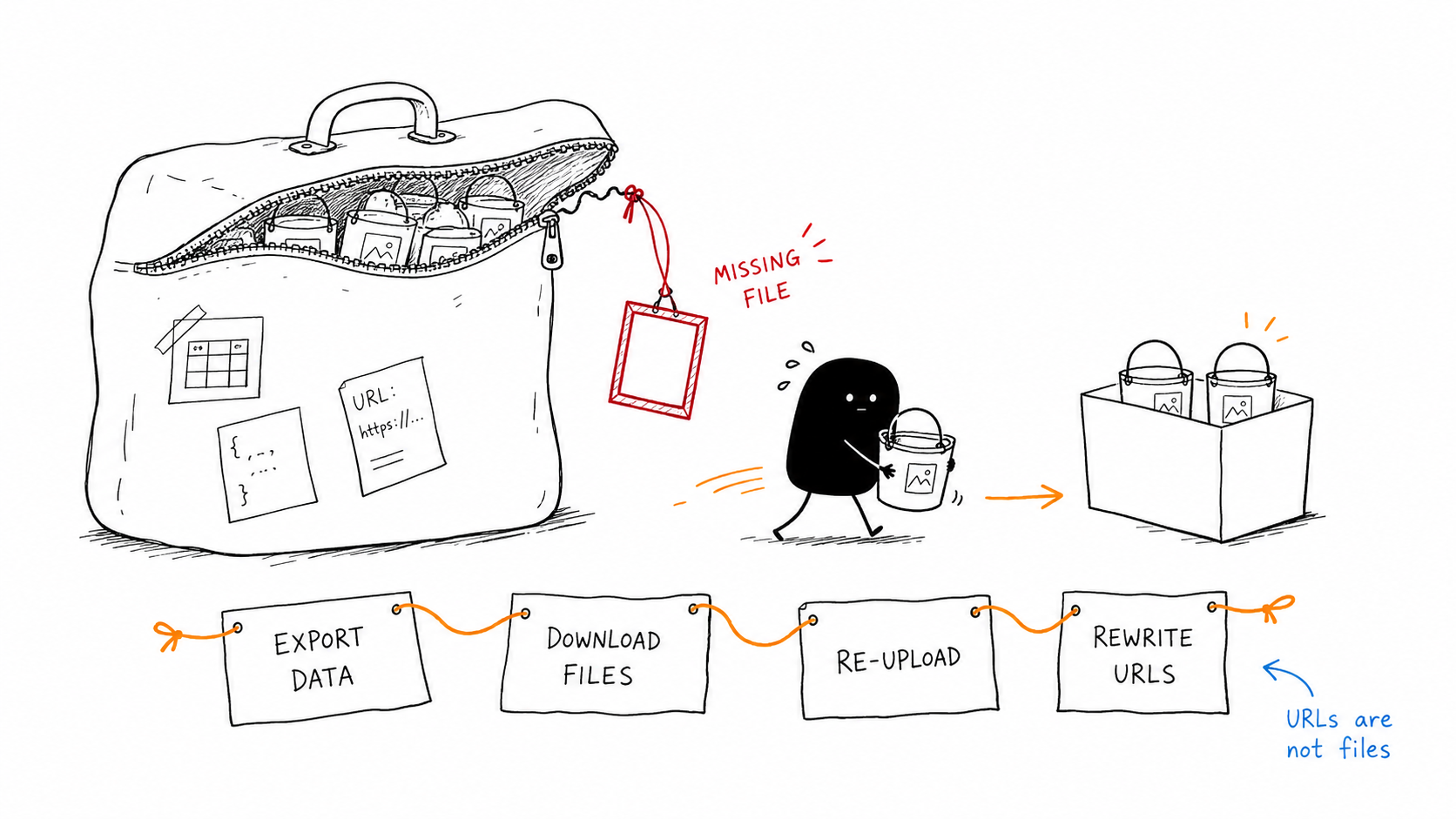
Files and images are the other trap. A CSV contains the URLs for Bubble-hosted files, not the files themselves. If you don’t copy the files, those URLs will stop working and the assets will disappear.
The UI and workflows must be rebuilt because Bubble doesn’t export that logic. Write down what each workflow does, which data it changes, and who can run it. That document becomes the spec for the AI agents.
Audit Privacy Rules while you still have editor access. Write down every rule because it defines the current authorisation model. If the audit is incomplete, the new app will miss rules you didn’t know existed.
File hosting needs its own migration
Bubble stores uploaded files in AWS and returns a URL. In custom code, you choose S3 or Cloudflare R2 and create the upload and access flow.
The order matters. Export data first. Download every file from every URL before Bubble hosting is gone. Upload the files to the new storage. Then rewrite the URLs stored in the database.
1Export data (URLs, not files)→
2Download every file→
3Re-upload to new storage→
4Rewrite stored URLs
Do these out of order and the files are gone before you notice.
Some Bubble URLs are signed and expire. Decide which files are public and which are private. Bubble also used a CDN for worldwide delivery and enforced file size and access rules. You now need to set up those rules yourself.
Each task is manageable on its own. The risk comes from discovering one after the cutover, when a user reports that a file is missing.
Data cleanup takes longer than the import
Bubble lets real data become inconsistent over time. A field can be empty when it shouldn’t be. It can hold a number for 9,000 records and text for the other 12. References can point to deleted records or drift out of sync.
Supabase or Xano will reject data that breaks the new schema. Common failures include:
Null values where a value is required.
Orphaned references to deleted records.
Duplicate emails in a field that should be unique.
Dates stored in three formats.
Option sets export as IDs or display text, not foreign keys. Linked Bubble things export as reference IDs instead of the relationships you see in the editor. Rebuilding those links takes time.
Cleaning, deduplicating, and reconciling the data will take longer than writing the import. Plan for that work before you estimate the migration.
This is usually the point where teams want a second pair of eyes.
We've done these migrations before: the file rehosting, the auth cutover, the Privacy Rules audit. Talk it through before you commit to a plan.
Bubble doesn’t let you export password hashes. That protects users, but it means you can’t move passwords to the new system and keep logins unchanged.
The first option is a forced password reset. Everyone moves at once. At cutover, each user gets a reset link. For the companies we helped migrate, we used a low-traffic window such as a weekend.
The second option is a trickle migration. The new auth system sits beside Bubble. When a user logs in for the first time, the new system checks the old Bubble credentials once and then stores the password in the new system.
For most apps with fewer than a few thousand users, a forced reset is simpler. Use trickle migration when a reset may cost users or when downtime is expensive.
Passwords are only one part of the account move. You also need profiles, roles, permissions, active sessions, social logins such as Google, and multi-factor setup. Cutover logs everyone out once, social logins must be linked again, and multi-factor authentication must be enrolled again.
You can use a managed provider such as Auth0 or Clerk, or run an auth library yourself. I recommend a managed provider unless you have a clear reason to take on the extra responsibility. The cost of a small auth mistake is high.
Data security becomes your responsibility
Bubble handled many security tasks in the background. In custom code, the default state of a new app is unprotected until you add the checks.
Rebuild every Bubble Privacy Rule as server-side logic, often with row-level security in the database. Keep API keys and other secrets in server-side environment variables.
When your framework releases a security update, you need to apply it. You also need to confirm encryption in transit and at rest through your hosting and database choices. Your API endpoints must validate input because they are exposed to the internet.
Security is where a solo migration can fail without an obvious error. A page can look correct while its data rules are wrong.
Bubble handled more than the editor showed
Bubble included several operations that you now need to configure or verify yourself.
Bubble handled itNow it is yours
Automatic daily backups
→
↳ You need to configure backups, mostly automatic on managed databases
DDoS protection
→
↳ Usually it's handled by your hosting or CDN, once set up
SSL certificate renewal
→
↳ It's again automatic, but you need to confirm it once
CDN
→
↳ You set it up once with Cloudflare
Autoscaling
→
↳ You choose a host that does it, or you tune it
Log retention
→
↳ You can choose your own logging setup
Compliance (SOC 2 etc)
→
↳ It largely depends on your database provider. It is again a one-time setup
The point is to include these tasks in the plan. “Set up backups” should be a work item, not a surprise after the first data problem.
Choose the stack around the team
You can use React, Next.js, or another frontend framework. AI agents work across the common frameworks, and stack choice costs less than it did when every screen needed to be written by hand. React and Next.js still tend to get the best results from current language models.
Pick a stack your team can review and maintain. A familiar framework is usually worth more than a clever one.
Start with the backend or one complete module
For a full migration, start with the database, auth, and core API. They tell you whether the data model is sound before you rebuild every screen. Codex is a good fit for backend and data-heavy work.
Starting with the frontend can make sense when the UI is the main problem. You can connect a new frontend to Bubble’s existing Data API and replace the app one module at a time while Bubble remains the backend.
For most teams, I recommend one complete module from top to bottom: database, API, and UI. Pick the module with the fewest dependencies. Map the modules that depend on it, then leave the most connected module until the foundations are tested.
The first module is a test of the migration plan. Find the problems there before you commit to rebuilding everything.
Build the design system before the pages
If you ask an agent to build pages without a design system, you get inconsistent spacing, colours, typography, buttons, and inputs. The app looks like separate screens instead of one product.
Set the colours, spacing, and typography first. Build components from those tokens. Then assemble the pages from the components.
If you have Figma designs, connect Figma to Claude Code or Codex so the agent can use the designs. Claude is better at frontend and UI work. Ask the agent to capture a screenshot with Playwright and review it. That review often catches layout problems that are hard to see in code.
The first result from an AI agent often has a default look. Moving away from it takes review and taste, not another vague prompt.
Rebuild backend rules before business features
The backend is a translation of the workflow document you wrote earlier. Each Bubble workflow becomes an API endpoint or a background job.
First, rebuild Privacy Rules. Each audited rule becomes server-side logic and row-level security. Don’t accept an agent’s statement that it “added security.” Test every rule from the audit.
Then import the cleaned data into the new schema. Run the file rehosting process and compare record counts. Count records in Bubble, count them in the new system, and investigate every mismatch.
Last, move scheduled and background work. Bubble’s scheduled API workflows should become cron jobs or queue workers.
Give AI agents a codebase they can review
Claude Code and Codex work better when the repo has clear rules and clear boundaries.
CLAUDE.md is where you write instructions for Claude Code, including coding standards, project rules, and details it should remember. Split domain rules into separate files so each session loads only what it needs.
Keep the frontend and backend in clear folders. That makes parallel work possible and reduces the chance that two agents edit the same area.
The migration document becomes your product requirements. Break it into small, complete vertical slices. Use Git from day one so you have branches, reviewable commits, and a clean way to undo a bad change.
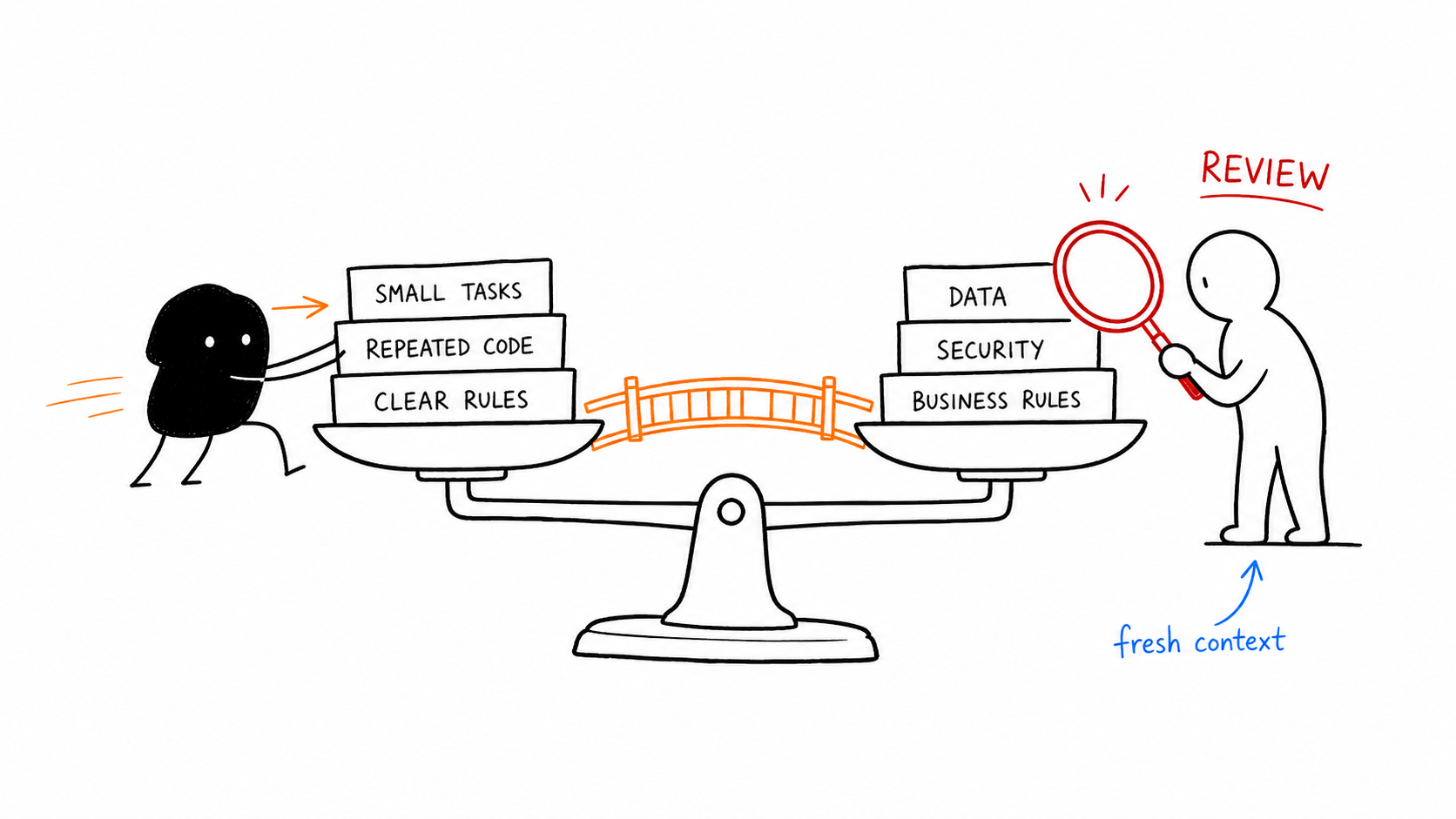
Claude is a strong choice for frontend work. Codex is a strong choice for backend and database work. Let one agent write a change and the other review it with fresh context.
Keep each agent’s context focused. A backend agent doesn’t need your CSS rules. Use tmux, zellij, separate directories, or Git worktrees when two agents need to work at the same time.
Keep a shared task list and mark dependencies. Check Git status often. Review changes before committing. Never let two agents edit the same files at once.
Give agents small, specific tasks. A prompt such as “build a dashboard” leaves too many decisions open and makes review harder.
Add checks before the first release
Run checks for every agent change. Pre-commit hooks can run formatters, linters, secret scanners, and basic tests.
CI should run the same checks before a release. Test the output before users rely on it. A second agent with fresh context can look for gaps, but the agent that wrote the code shouldn’t be the only reviewer.
AI agents still need a reviewer
AI agents are good at well-defined tasks, repeated code, and changes that follow existing conventions. They are less reliable with business rules and security decisions.
An agent may claim that an authorisation check or Privacy Rule exists when it doesn’t. It may choose a convenient library instead of the right one. Good tests and a clear reviewer catch these errors.
Agents can help with a Bubble migration. They don’t replace knowing what correct looks like. If nobody on the team can check the data model and business rules, the migration needs experienced help before code generation starts.
Your maintenance plan starts after cutover
After migration, someone still needs to maintain the app. You can hire an engineer, keep working with the team that built it, or use Claude or Codex for a simple product. Pick the option that matches the app’s risk and complexity.
Running costs change after migration
Your Bubble bill was one plan plus Workload Unit overages. The new bill has several services: hosting, a database, object storage for files, auth, email, monitoring, and a domain.
Costs often rise at first. As usage grows, the new setup can cost less than Bubble, especially for high-usage apps. You also own the code and can choose how the app runs.
Common migration mistakes
These are the failures worth checking before cutover:
Assuming Bubble has a one-click export to code. It doesn’t.
Forgetting that exported files are URLs and losing the assets when Bubble hosting ends.
Pulling a large table through the Data API in one request and receiving only 100 records.
Trying to migrate password hashes that Bubble doesn’t export instead of planning a reset or trickle strategy.
Leaving out Privacy Rules and exposing the new app’s data.
Putting every instruction in one large CLAUDE.md.
Giving agents vague prompts such as “build a dashboard.”
Asking an agent for a large multi-file rewrite instead of small changes.
Letting two agents edit the same files at once.
Trusting an agent’s claim that something works without checking it.
Underestimating the time needed for data cleaning.
Forgetting that you now own backups, patching, and uptime.
Cutting over without a rollback plan.
Ready to plan your migration?
Most rebuilds run $15k to $25k over three to five months. We'll scope yours in one call. And if a partial migration is all you need, that's what we'll tell you.
Himanshu runs NocodeAssistant, a development agency that builds internal tools and SaaS products for growing companies. He's worked directly with every client since 2019. Same person from kickoff to post-launch.
A private family office. 3 investment staff. 450 companies on the watchlist. Days of manual reading before every committee meeting. We built an internal AI tool over 2,200 annual reports and earnings call transcripts: cited, grounded, verified. Full case study.
18k orders/month, 4,200 tickets, 3 support agents. A custom AI support agent cut median first response from 4.2 hours to 8 seconds and support team cost by 35%.