
Warum interne Tools bei 50 Mitarbeitenden ausfallen (und wie Sie das beheben)
Ihr Team wächst. Sie haben Ihren 50. Mitarbeitenden eingestellt, und Ihre Prozesse werden komplexer. Um Ihr wachsendes Unternehmen zu verwalten, entwickeln Sie ein individuelles internes Tool.
Zunächst beginnt alles, sich zu fügen, doch zwei Jahre später bricht wieder alles auseinander. Ihre Betriebsleitung ist frustriert, die Leitung des Kundensupports hat nicht die richtigen Informationen, und Ihr Vertriebsteam hat nicht die richtigen Leads. Sie fragen sich also, ob das interne Tool, das Sie entwickelt haben, die falsche Entscheidung war.
Das war es nicht.
Aber was hat sich verändert? Und wie lässt sich erklären, dass Ihr individuelles internes Tool, das vor zwei Jahren noch problemlos funktioniert hat, jetzt auseinanderfällt? Müssen Sie das interne Tool neu aufbauen oder müssen Sie es reparieren? Und vor allem: Warum funktioniert es nicht mehr so wie vor zwei Jahren? Es ist sehr verlockend, vorschnell anzunehmen, dass Sie sich mehr zugemutet haben, als Sie bewältigen können.
Vielleicht glauben Sie, dass das ursprüngliche Team einige schlechte Entscheidungen getroffen hat. Vielleicht ist die Architektur falsch, oder vielleicht wurde das Ganze von Anfang an falsch eingerichtet. Manchmal stimmt das, aber meistens liegt es nicht daran, dass das Tool nicht funktioniert.
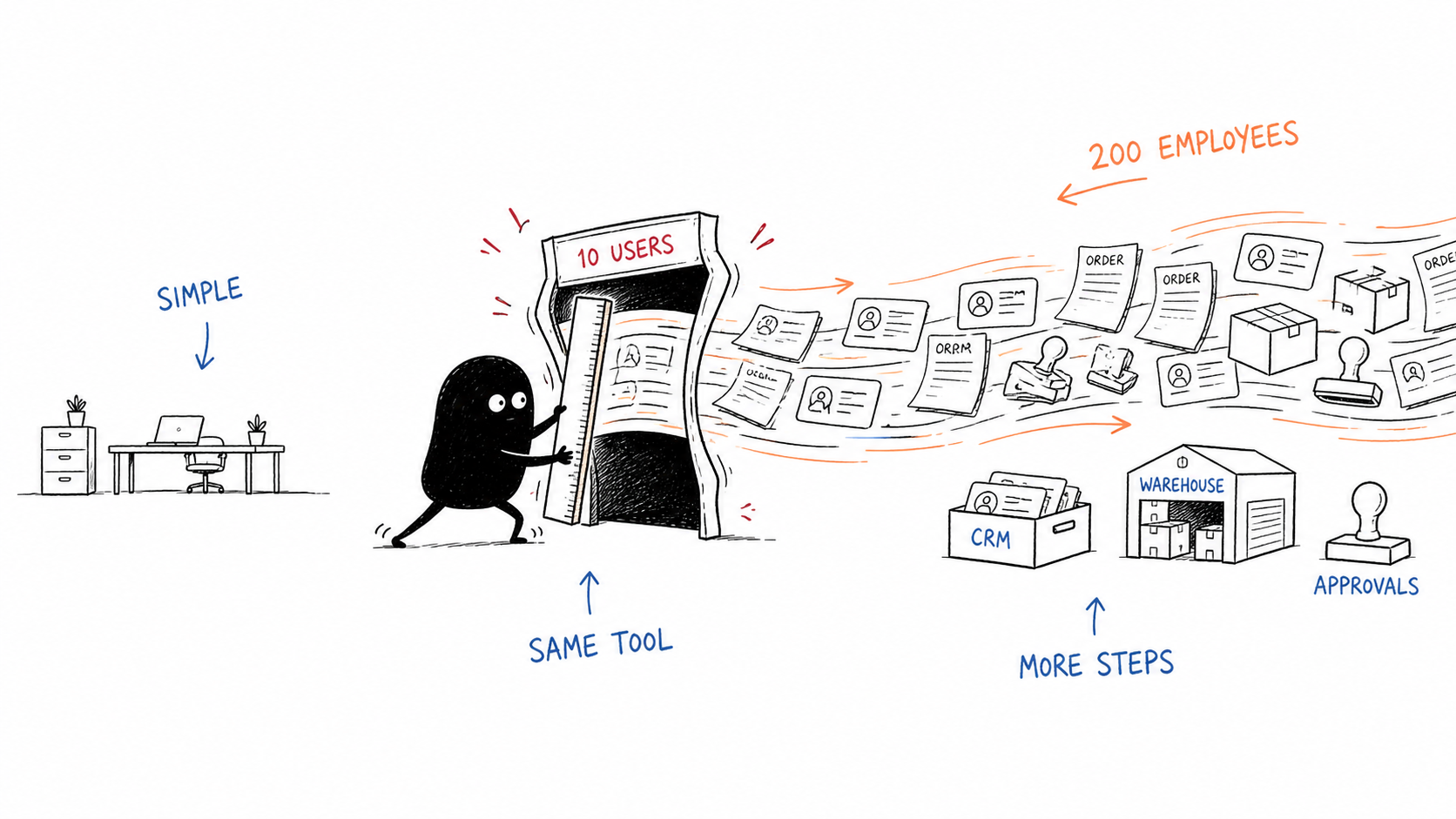
Nehmen wir also einen einfachen Prozess zur Auftragsfreigabe. Als Sie noch ein kleines Team waren, umfasste der Prozess von der Auftragserteilung bis zur Lieferung drei bis vier Schritte. Jetzt müssen Sie Kundendaten zum CRM hinzufügen. Der CRM-Auftrag muss an das richtige Lager weitergeleitet werden, und innerhalb dieses Lagers kann es verschiedene Manager geben, jeweils mit ihrer eigenen Freigabekette, die ebenfalls protokolliert werden muss.
Tatsächlich ist das ein gutes Problem, weil es bedeutet, dass Ihr Unternehmen wächst. Das ist jedoch nicht der einzige Grund, warum interne Tools ausfallen. Es gibt einige Gründe für ihr Versagen und Möglichkeiten, ihnen entgegenzuwirken. Nach unserer Erfahrung fallen interne Tools aus einigen häufigen Gründen aus.
Fehler 1: Kein klarer Verantwortlicher
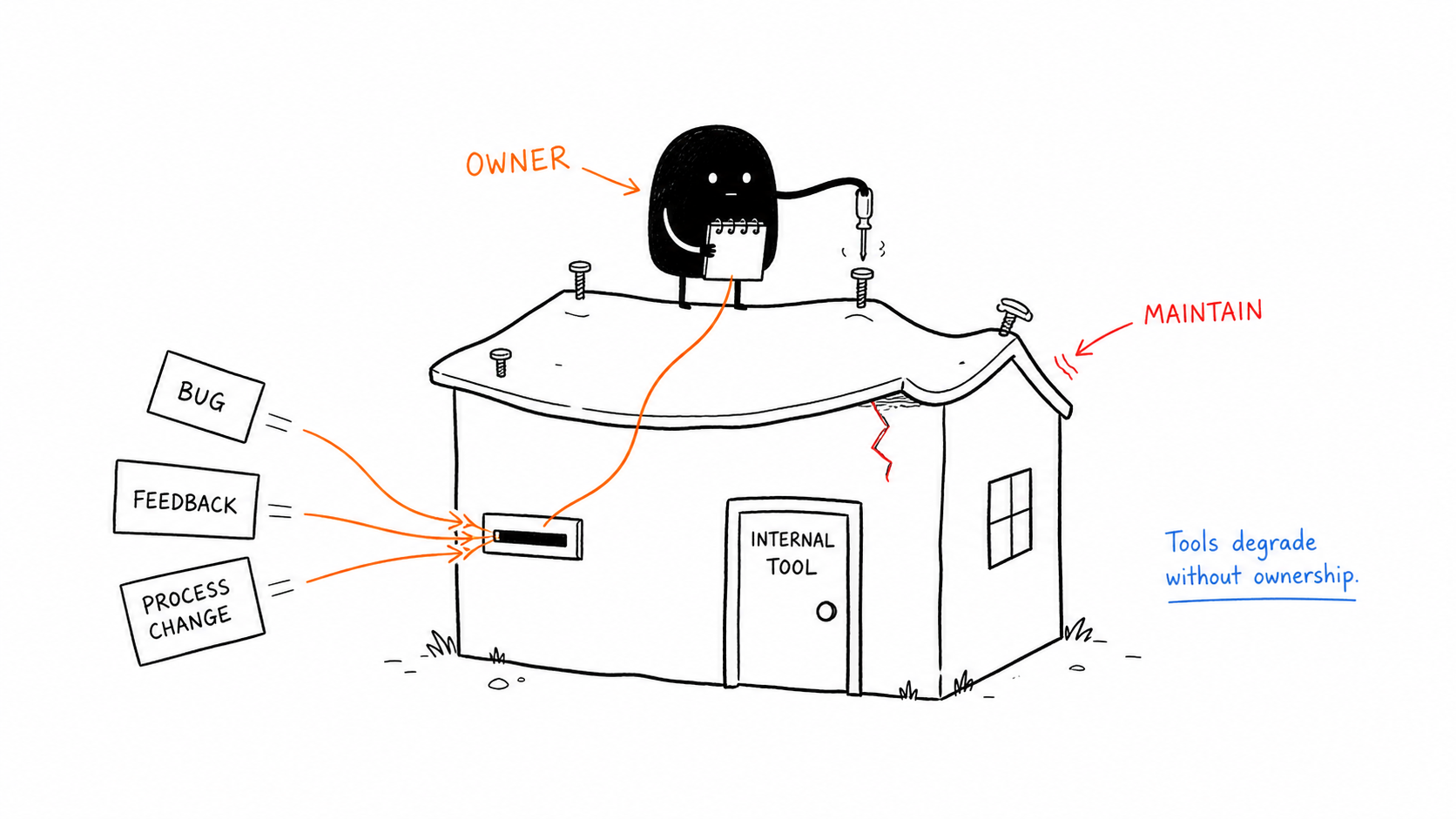
Der häufigste Grund für das Versagen interner Tools ist unserer Erfahrung nach, dass Unternehmen sie mit großer Begeisterung entwickeln. Aber sie bestimmen niemanden, der das Tool pflegt und seine Nutzung im gesamten Unternehmen vorantreibt.
In mittelständischen und kleinen Unternehmen ist es normalerweise der CEO, der ein internes Tool möchte. Sobald es entwickelt ist, hat der CEO natürlich keine Zeit, dafür zu sorgen, dass es gut gepflegt wird. Wenn dann ein neuer Fehler gemeldet wird, sich der Prozess ändert oder Teammitglieder Feedback geben, gibt es niemanden, an den sie sich damit wenden können. Das bedeutet, dass das interne Tool über einen Zeitraum von meist ein oder zwei Jahren schlechter wird, obwohl es noch so funktioniert, wie es vor zwei Jahren entwickelt wurde.
Die Lösung besteht darin, in Ihrem Unternehmen einen Verantwortlichen für das interne Tool zu benennen, der für Wartung und Upgrades zuständig ist.
Fehler 2: Benutzer werden ausgeschlossen
Der zweithäufigste Grund für das Versagen interner Tools ist, dass die Endbenutzer nicht am Planungsprozess beteiligt sind. Meist sind es die CEOs oder VPs, die ein internes Tool vorantreiben, und sie verfügen über viel operatives Wissen. Trotzdem werden die Endbenutzer das Tool verwenden und können erklären, wie ihr ideales internes Tool funktionieren sollte, einschließlich Sonderfällen und Ausnahmen.
Fehler 3: Komplexität des Workflows
Zu Beginn kann kein Unternehmen ein internes Tool entwickeln, das seine Prozesse vollständig automatisiert. Sie werden immer jemanden brauchen, der es verwendet. Konzentrieren Sie sich daher darauf, diese Arbeit einfacher zu machen, statt die Menschen zu ersetzen. Das bedeutet auch, dass das interne Tool möglicherweise nicht jedes Szenario abdecken kann und solche Fälle kennzeichnen muss.
Fehler 4: Das Tool wurde falsch entwickelt
Es kommt selten vor, aber in manchen Fällen wurde das interne Tool tatsächlich falsch entwickelt. Die UX kann für die Benutzer schwer zu bedienen sein, oder die UI kann ein Problem darstellen.
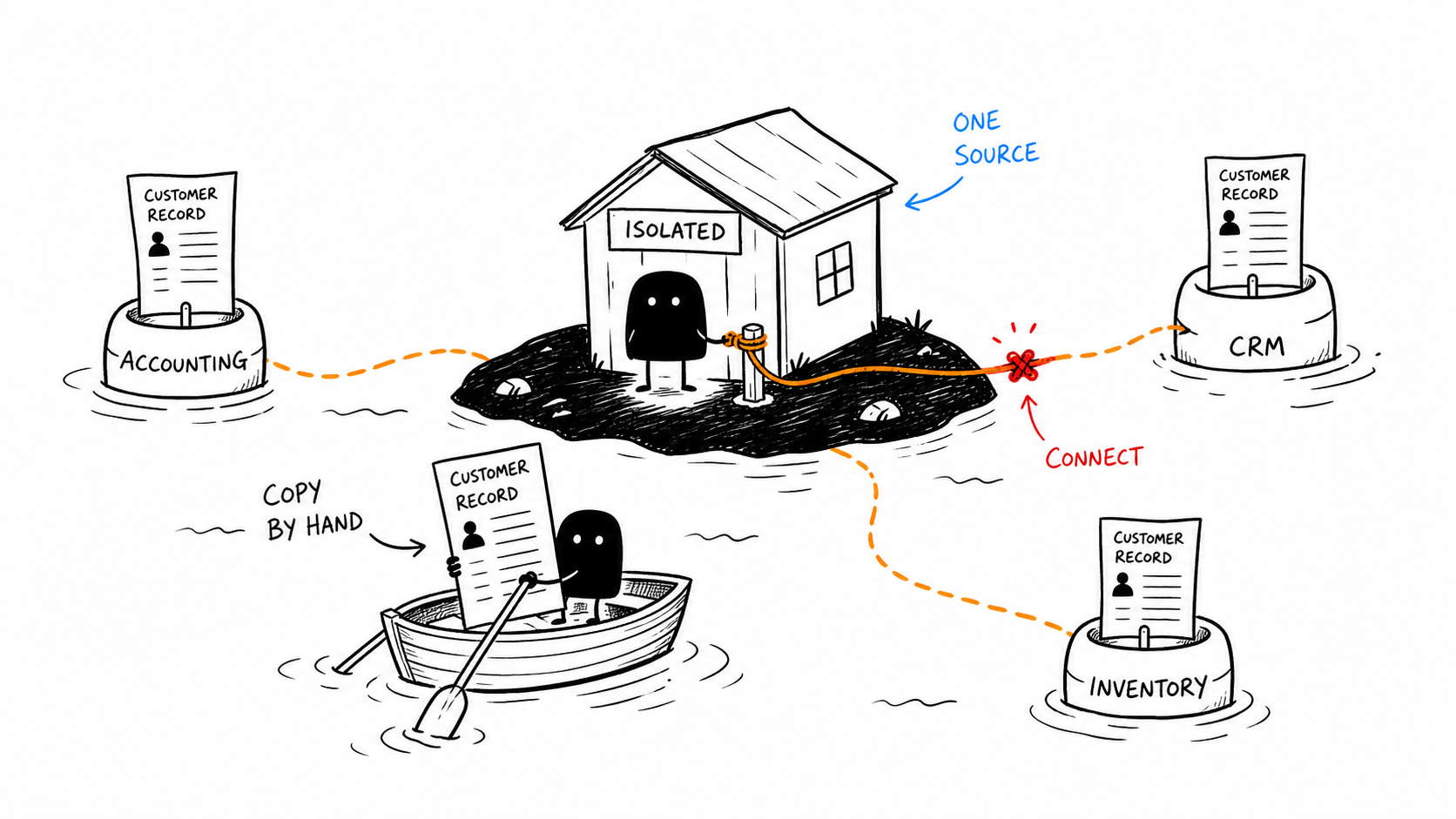
Es ist auch möglich, dass die Integrationen nicht korrekt eingerichtet sind und das Tool als eigenständige App entwickelt wurde. Jetzt, da Ihr Unternehmen gewachsen ist, soll es sich aber mit Ihrem CRM, Ihrer Buchhaltungssoftware und Ihrem Lagersystem verbinden. Dadurch verbringen Mitarbeiter Stunden damit, Daten zwischen Systemen zu kopieren.
Nicht jede technische Schuld ist schlecht. In manchen Fällen sind Sie gezwungen, Abkürzungen für Probleme zu nehmen, die Sie noch gar nicht haben. Das Problem beginnt, wenn Sie diese Schuld nie beheben. Sie können eine vorübergehende Umgehungslösung verwenden, aber wenn Sie sie zu einem dauerhaften Feature machen, wird jedes zukünftige Feature darauf aufbauen, und früher oder später werden Ihre kleinen Änderungen anfangen, alles auseinanderzubrechen.
Der neue Fehler: KI-generierte interne Tools
Viele Menschen und Unternehmen experimentieren inzwischen mit LLMs, um ihre internen Tools per „Vibe Coding“ zu entwickeln. Und bis zu einem gewissen Grad funktioniert das auch.
Aber es funktioniert nur so lange gut, bis Sie das Tool im großen Maßstab einsetzen. Diese mit Claude oder Codex per Vibe Coding entwickelten internen Tools funktionieren gut, bis Sie sie mit echten Kunden einsetzen, ein Berechtigungsmodell benötigen oder ein konsistentes Design brauchen.
So finden Sie heraus, warum Ihr internes Tool ausfällt
Bevor Sie etwas reparieren, müssen Sie herausfinden, was defekt ist. Wenn Sie das Falsche reparieren, verschwenden Sie Geld und Zeit.
Beginnen Sie mit diesen drei Fragen.
Ist das Tool langsam?
Sehen Sie sich den wichtigsten Workflow an, den Ihr Team täglich verwendet.
Wie lange dauert es, eine Seite zu öffnen, einen Datensatz zu finden, eine Änderung zu speichern oder einen Datensatz zu erzeugen? Hat sich diese Zeit verlängert, seit Sie das interne Tool entwickelt haben oder seit Ihr Team gewachsen ist?
Fragen Sie Ihre Benutzer, was sie tun, während sie warten. Wenn sie eine Tabellenkalkulation öffnen oder Daten in ein anderes Tool kopieren, haben Sie Performance-Probleme.
Prüfen Sie die Datenbankabfragen und API-Aufrufe, bevor Sie die UI ändern. In manchen Fällen benötigt ein langsamer Bericht einen Index oder einen Hintergrundprozess und keinen vollständigen Neuaufbau des API-Aufrufs oder des internen Tools.
Ist das Tool schwierig zu bedienen?
Sie können ein schnelles internes Tool entwickeln, aber die Mitarbeiter verwenden es möglicherweise trotzdem nicht regelmäßig.
Bitten Sie verschiedene Benutzer, dieselbe Aufgabe zu erledigen, und beobachten Sie, wie sie das interne Tool verwenden.
Verwenden sie unterschiedliche Wege? Nutzen sie unterschiedliche Funktionen? Überspringen sie manche Funktionen? Gibt es Bildschirme, die zu viele Informationen anzeigen, oder Freigabeschritte, die zu komplex sind?
Das bedeutet normalerweise, dass das Tool komplexer geworden ist, als es ursprünglich vorgesehen war. In diesem Fall können UI und UX vereinfacht werden.
Kopiert Ihr Team Daten zwischen Systemen?
Beginnen Sie damit, jedes Drittanbieter-Tool aufzuschreiben, das Ihr Team verwendet.
Das können Ihr CRM, Ihre Buchhaltungssoftware, Ihr Inventarsystem oder Ihr Lagerverwaltungssystem sein. Finden Sie anschließend heraus, wie häufig diese Drittanbieter-Tools verwendet werden, denn in diesen Bereichen könnte Ihr Team Daten zwischen den Tools kopieren und einfügen.
In diesem Fall sollten Sie das interne Tool nicht neu aufbauen, da das Problem dadurch nicht gelöst wird. Sie müssen API-Integrationen oder MCP calls hinzufügen, um das Problem zu lösen.
Am Ende dieser Prüfung können Sie herausfinden, warum Ihr internes Tool ausfällt.
Wie reparieren Sie Ihr internes Tool?
Sobald Sie wissen, warum Ihr Tool ausfällt, können Sie es reparieren. In den meisten Fällen müssen Sie es nicht von Grund auf neu aufbauen.
Wenn Ihr internes Tool langsam ist, finden Sie den Workflow, in dem Benutzer die meiste Zeit verlieren. Beginnen Sie mit den Seiten und Abfragen, die am häufigsten verwendet werden.
Diese Änderungen klingen klein, aber bei einem Unternehmen, mit dem ich gearbeitet habe, brauchte ein Berichtsbildschirm 45 Sekunden zum Laden. Wir haben zwei Datenbankspalten indiziert, und der Bildschirm lädt jetzt auch bei längeren Ausführungen in 3 Sekunden.
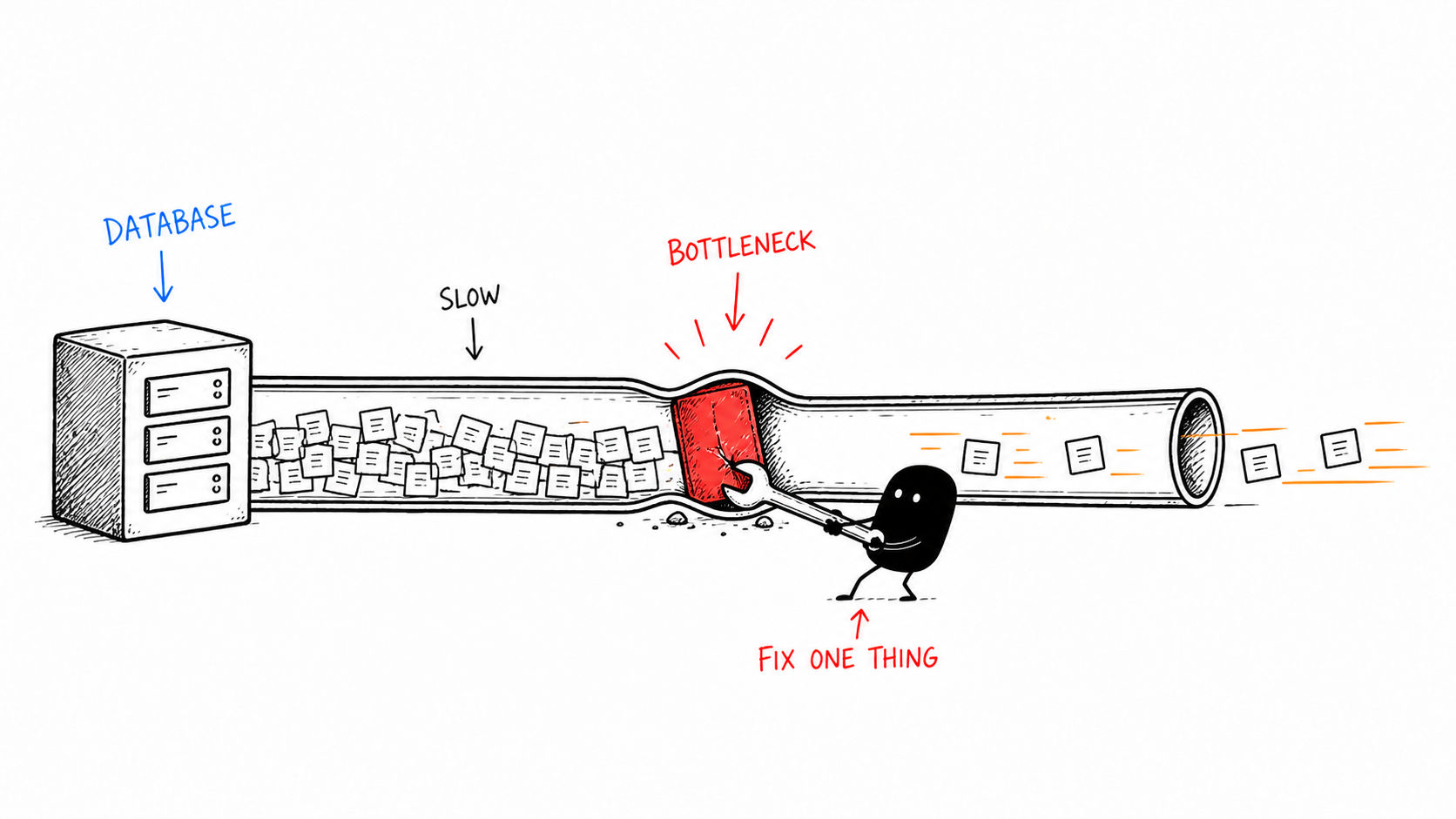
Wenn Ihr internes Tool schwierig zu bedienen ist, begrenzen Sie die pro Seite geladenen Daten, fügen Sie eine Seitennummerierung hinzu und verschieben Sie umfangreiche Berichte in Hintergrundaufgaben.
Erstellen Sie rollenbasierte Ansichten, damit verschiedene Benutzer unterschiedliche Teile der Anwendung sehen. So können Sie Funktionen ausblenden, die sie nicht benötigen.
Sie können auch einige zentrale Workflows auswählen, die sich über alle Abteilungen hinweg überschneiden, damit jeder weiß, wofür das Tool tatsächlich gedacht ist. In den meisten Fällen ist dafür kein neues internes Tool erforderlich. Nur die UI/UX muss verbessert werden.
Langfristig können Sie Ihr internes Tool modularisieren. Sie können kleinere Tools entwickeln, die eine Datenbank gemeinsam nutzen, oder ein zentrales internes Tool erstellen und von dort auf die kleineren internen Tools verlinken. Auf diese Weise müssen Sie die Datenbank nicht ersetzen. Aktualisieren Sie stattdessen die Benutzeroberfläche.
Wenn es sich um ein nicht verbundenes Tool handelt, bilden Sie zuerst die Prozesse ab. Entscheiden Sie dann, welche Integrationen erforderlich sind, und bewerten Sie sie anhand des damit verbundenen manuellen Aufwands. Selbst eine kleine API-Integration kann ein Problem lösen, ohne das interne Tool von Grund auf neu zu entwickeln.
Benennen Sie schließlich einen Verantwortlichen für das interne Tool. Dieser Verantwortliche muss keinen Code schreiben. Er muss lediglich Feedback sammeln, Änderungen genehmigen, Fehler verfolgen und sicherstellen, dass Ihr Team das interne Tool weiterhin verwendet.
Reparieren oder neu aufbauen?
Das ist normalerweise der Fall, wenn
- Die wichtigsten Workflows weiterhin nützlich sind.
- Die Probleme hauptsächlich Performance, schlechte UX oder fehlende Integrationen betreffen.
- Der Code von jemand anderem in Ihrem Team verstanden werden kann.
Andererseits sollten Sie das interne Tool neu aufbauen, wenn die Grundlagen nicht stimmen.
- Die Datenstruktur nicht zu dem passt, was Sie derzeit haben.
- Niemand versteht, wie das interne Tool funktioniert.
- Der ursprüngliche Entwickler nicht mehr da ist und Sie keine Dokumentation des internen Tools haben.
- Jede neue Änderung am internen Tool neue Fehler verursacht
- Das interne Tool von Systemen abhängt, die Sie nicht mehr verwenden. Ein einzelnes Problem bedeutet nicht, dass Sie das interne Tool neu aufbauen müssen. Eine fehlende Integration oder ein langsamer Bericht lässt sich immer beheben.
Führen Sie daher eine kurze technische Prüfung durch, bevor Sie sich entscheiden. Sie sollten wissen, was beibehalten werden kann, was ersetzt werden muss, welche Risiken nach der Reparatur bestehen bleiben, wie lange Reparatur und Neuaufbau dauern werden und welche Möglichkeiten Sie zur Wartung des Tools haben.
Ein einfacher Plan für ein fehlerhaftes internes Tool
- Führen Sie Gespräche mit einigen Benutzern in Ihrem Unternehmen.
- Entfernen oder frieren Sie Funktionen und Workflows ein, die niemand verwendet.
- Machen Sie einen Workflow hervorragend, statt zehn mittelmäßige Workflows zu haben.
- Teilen Sie ein komplexes internes Tool in kleinere Tools auf.
- Benennen Sie einen Verantwortlichen für das interne Tool.
- Prüfen Sie nach 30 und 60 Tagen, ob die Verbesserungen zu einer höheren Nutzung geführt haben. Nehmen wir an, Sie haben ein Team von 50 Personen und 8 davon verbringen täglich 30 Minuten mit einem fehlerhaften internen Tool. Das sind etwa 4 Stunden verschwendete Zeit pro Tag und mehr als 1.000 Stunden pro Jahr.
Vergleichen Sie das nun mit den durchschnittlichen Kosten eines Mitarbeiters, die zwischen 40.000 und 80.000 $ liegen.
Jeden Monat, in dem Sie Ihr internes Tool nicht reparieren, sinkt Ihre Produktivität. Die Arbeit Ihres Teams wird schwieriger, und die Umgehungslösungen werden komplizierter.
Die Reparatur eines internen Tools kostet in jedem Fall nur einen Bruchteil dessen, was Sie jedes Jahr verschwenden.
Häufig gestellte Fragen
Warum funktionieren interne Tools nicht mehr, wenn ein Unternehmen auf mehr als 50 Mitarbeitende wächst?
Es liegt nicht daran, dass die Tools schlecht sind. Es liegt daran, dass sich die Art und Weise, wie das Tool genutzt wird, verändert hat. Ein Tool, das für 10 Benutzer entwickelt wurde, unterscheidet sich stark von einem Tool, das von 50 Mitarbeitenden in einem Unternehmen verwendet wird. Datenvolumen und Berichtszeiten haben sich verändert. Der einfache Workflow wird komplexer, und mit der Zeit verwenden Sie mehr Tools von Drittanbietern, sodass Daten zwischen ihnen übertragen werden müssen.
Woher weiß man, ob man ein internes Tool reparieren oder von Grund auf neu aufbauen sollte?
Sie können Ihr internes Tool reparieren, wenn die grundlegende Basis stimmt und es hauptsächlich Performance-Probleme oder fehlende Integrationen gibt. Bauen Sie es neu auf, wenn die Technologie veraltet ist, das Datenmodell falsch ist, der ursprüngliche Entwickler nicht mehr da ist und niemand den Code versteht oder die technische Schuld so schwerwiegend ist, dass jede Änderung etwas kaputt macht.
Wie viel kostet ein fehlerhaftes internes Tool an verschwendeter Zeit?
Ein Team aus 8 Personen, das täglich 30 Minuten mit einem fehlerhaften internen Tool arbeitet, verliert jährlich 40.000–80.000 $. Wir berechnen nur einen Bruchteil der Kosten eines Jahres.
Was ist der schnellste Weg, ein langsames internes Tool zu reparieren?
Beginnen Sie mit einer Diagnose des internen Tools, bevor Sie Änderungen vornehmen. Die meisten Probleme lassen sich durch Datenbankindizierung oder UI/UX-Änderungen lösen. Wir haben einem Unternehmen geholfen, die Zeit zur Berichtserstellung durch das Hinzufügen von Datenbankindizes von 45 Sekunden auf 3 Sekunden zu verkürzen.
Was sind die Warnzeichen dafür, dass ein internes Tool kurz vor dem Ausfall steht?
Achten Sie auf allmählich zunehmende Ladezeiten, Benutzer, die eigene Tabellenkalkulationen pflegen, weil Ihr internes Tool den Workflow nicht bewältigen kann, sowie auf eine steigende Zahl von Support-Tickets oder Slack-Nachrichten darüber, dass das Tool nicht funktioniert.
Reparieren oder ersetzen? Es hängt davon ab, wo die Grenzen tatsächlich liegen.
Wir bauen interne Tools neu auf, die an ihre Wachstumsgrenze gestoßen sind. Ein 30-minütiges Gespräch reicht aus, um Ihre aktuelle Situation zu besprechen und Ihnen ehrlich zu sagen, welche Richtung sinnvoll ist.

Himanshu leitet NocodeAssistant, eine Entwicklungsagentur, die interne Tools und SaaS-Produkte für wachsende Unternehmen erstellt. Seit 2019 hat er direkt mit jedem Kunden zusammengearbeitet – dieselbe Person vom Kick-off bis nach dem Launch.
Auf LinkedIn verbindenLassen Sie uns reden
Ihre internen Tools wurden für ein 10-köpfiges Team entwickelt. Jetzt sind Sie 50.
Vereinbaren Sie ein entspanntes 30-minütiges Gespräch. Bringen Sie alles mit, was Sie beschäftigt — wir helfen Ihnen, es zu durchdenken, ob Sie je mit uns arbeiten oder nicht.
- Ein freundliches Gespräch, kein Verkaufsgespräch
- Keine Vorbereitung, keine Verpflichtung, kein Druck
- Gehen Sie mit Ihren Fragen beantwortet