
Process
How to Write User Stories for Bubble Apps | NocodeAssistant
Learn how to write effective user stories in Bubble with this guide. Discover why user stories are important and accelerate product development.
Himanshu Sharma ·
Bubble lets you build apps without code. This doesn’t mean you don’t need to plan. You still need a clear scope, user testing, and someone who can make trade-offs when the idea changes.
At our Bubble agency, we use the process below for all Bubble apps. It starts with a discovery call and ends with testing, app transfer, documentation, and optional maintenance.
The process gives you a way to compare agencies before you sign. Ask where they define the scope, who approves the user stories, how they test each feature, and what you receive after the app is complete.
The early calls are where most budget decisions happen. An open scope becomes extra meetings, more revisions, and a larger bill. A clear scope gives both sides something to check as the work moves forward.
Related: What is a Bubble Agency
Related: How we run every project: the step-by-step breakdown
A discovery call is a short first meeting. We discuss the problem, the people who have it, the outcome you want, and what you already know about the product.
The call usually includes you, our development team, and a project manager when one is needed. We can use Zoom, Google Meet, or another video call tool.
We use the call to:
After the call, we send a summary of the discussion and the next steps. Depending on the project, those steps can include an NDA, a scoping call, a wireframe, or a review of API documentation.

The scoping call turns the idea into a project outline. We go through user journeys, data structure, workflows, design preferences, integrations, risks, timeline, budget, and deliverables. Some projects need more than one call.
The goal is a shared view of what Bubble will do and what it won’t do. This matters because a simple software change can take far longer than expected when the scope is unclear. Here is why internal tools break as companies grow.

After the call, we prepare a proposal with the timeline, budget, milestones, and deliverables. We review it with you before we create the wireframes. This is also the point to ask how user testing your no-code app will fit into the plan.
User stories describe what a person wants to do and why. They help us plan the work around user needs instead of starting with a list of screens.
We write each story in this format: As a [user], I want to [action] so that [reason]. Each story should be specific, short, and linked to acceptance criteria. The criteria tell us how to check that the story is complete.
For a blog platform, the stories might be:
A product feature describes what the app has. A user story describes the problem the feature solves.
We use user story mapping to place these stories along the customer journey. The map shows the main activities from left to right, then puts the smaller tasks under each activity in priority order.
We group related stories into releases. This helps us decide what belongs in the first usable version and what can wait. A release should support a complete part of the customer journey, not just add an isolated feature.

A wireframe shows the layout and navigation of each page. It is a rough plan, not a final design. At this stage, we care about the page structure, the user journey, and the features included in each screen.
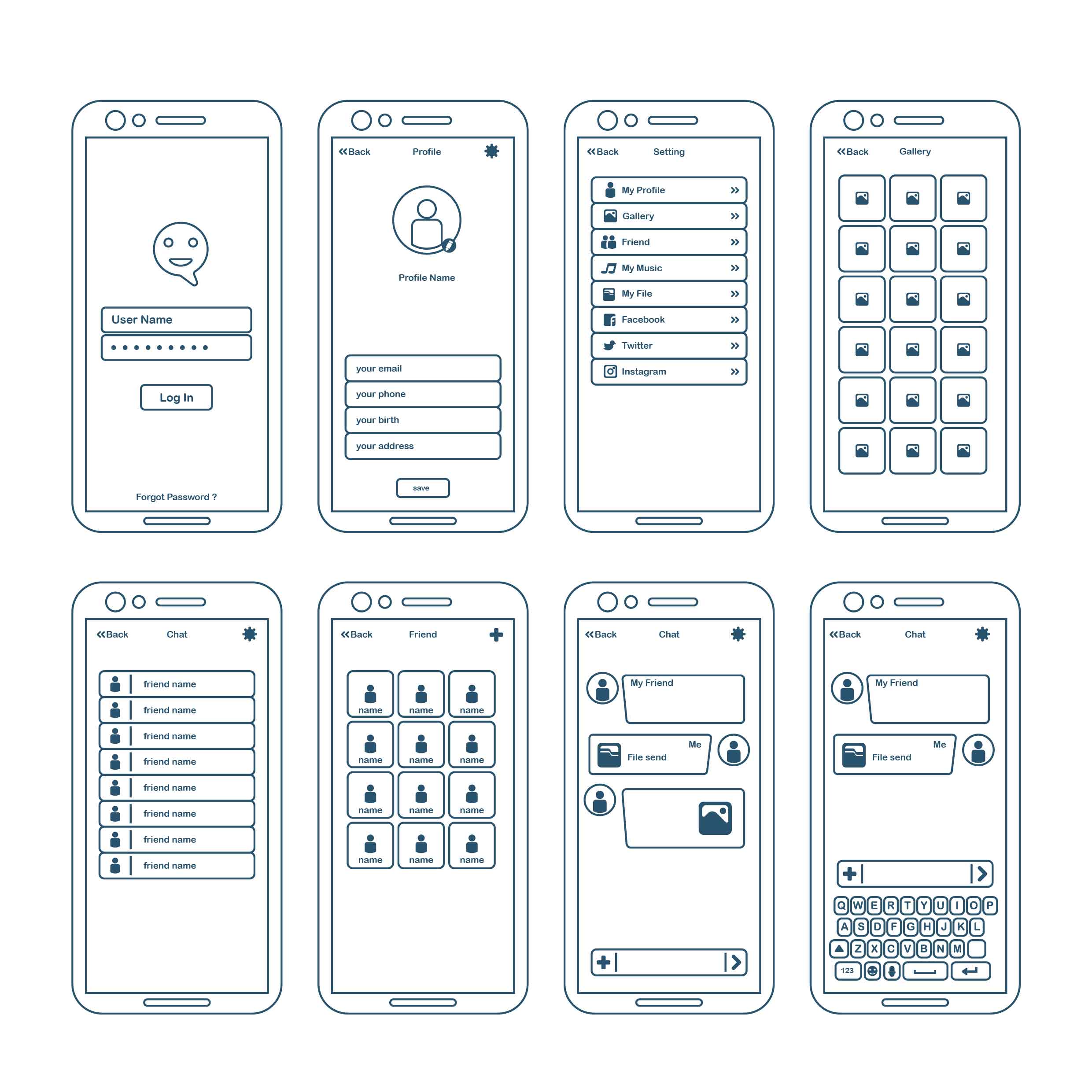
We use Balsamiq or Miro for wireframes. A useful wireframe shows what is in scope, what is out of scope, and how the pages connect. It should still be easy to change.
We may start with pen and paper, then use simple shapes, labels, annotations, and content placeholders. We add references when a familiar pattern, such as a calendar view, helps explain the intended interaction. Feedback from you and potential users informs the next revision.
Once the user stories and wireframes are agreed, the project has a defined scope. We can then share a binding proposal with the timeline, budget, milestones, and scope of work.
High fidelity designs show the visual details of the product, including colours, fonts, icons, images, and interactions. We use Figma so you and other stakeholders can review the screens before development begins.

We use the user stories and wireframes as the base. Then we apply the visual system, including the colour palette, typography, iconography, and spacing. We share the designs for feedback and update them before development.
For an MVP, function comes before decoration. The interface should be clear and usable. It doesn’t need every optional interaction or a design award.
After the user stories, wireframes, and designs are ready, we build the MVP in Bubble. Bubble lets us create the web app without writing traditional code. This is the same general process we use for MVP development projects where the first version needs a tight scope.
We track user stories and acceptance criteria in Trello. Each card can include files, comments, checklists, and estimates.

The work runs in sprints that usually last one or two weeks. A sprint can combine parts of different areas instead of finishing all design first and all workflows later. For example, one sprint might cover the landing page, sign-up process, and user profile page.
We add the stories and acceptance criteria to Trello and update the board as work progresses. We use Slack for questions and project communication, so decisions don’t sit in an email thread.
When an epic is complete, it moves to testing.
Testing checks whether the app follows the agreed requirements and finds defects before users rely on it. It is narrower than QA, which also covers the processes used to prevent problems across the development lifecycle.
We test each user story against its acceptance criteria. Common tests include:
If a story passes, we mark it done. If it fails, it returns to development. After a sprint, you review the completed epics and accept or reject them. An accepted epic becomes part of the MVP. A rejected epic goes back for changes.

Bubble also has an AI offering that some teams use to speed up parts of development. Our Bubble AI review explains where it helps and where it falls short.
After the epics and user stories pass testing, we complete the project setup for you.
Maintenance covers bug fixes, updates, and changes after the app is in use. You can request work when needed, or choose a retainer with a fixed monthly fee. On-demand work uses a fixed hourly rate. A retainer can run monthly, quarterly, or yearly.
Some changes are expected. The problem is making them without checking the effect on the timeline, budget, and other features.
We review each request for feasibility, need, and value. We discuss the trade-offs and any options that solve the same problem. If the scope changes, we record the decision in a change order or contract amendment and update the project plan, schedule, budget, and deliverables.
User stories and wireframes reduce avoidable changes because you review the intended behaviour before development starts. They don’t stop every change. They make the cost of a change easier to see.
Related: How to collaborate with a Bubble agency
Your involvement is highest through the wireframe stage. We need your input to check that we understand the problem and are building the right thing. Once the user stories and wireframes are approved, you can step back while we build and test the app.
It is hard to turn an idea in your head into a page someone else can build. User stories and wireframes give both sides something concrete to review. That is why this process starts with scope and user journeys before Bubble work begins.
See how we set scope before we build
We use the first week to define the scope, data model, and user stories. A 30-minute call can show you how the process works and what it may cost.
Himanshu runs NocodeAssistant, a development agency that builds internal tools and SaaS products for growing companies. He's worked directly with every client since 2019. Same person from kickoff to post-launch.
Connect on LinkedInLet's talk
Book a relaxed 30-minute call. Bring whatever you're wondering about and we'll help you think it through, whether or not you ever work with us.
Continue reading
Learn how to write effective user stories in Bubble with this guide. Discover why user stories are important and accelerate product development.
Here's a quick guide to understanding how long your Bubble app will take to launch. Learn about the cost & time advantages compared to traditional coding.
Why it's absurd to do hourly billing, why we do fixed price project for no-code development and how we overcome its challenges.